
Screenshots
Introduction
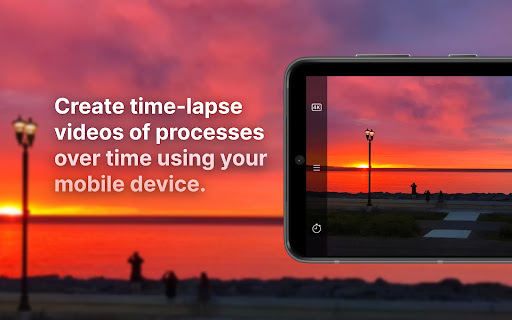
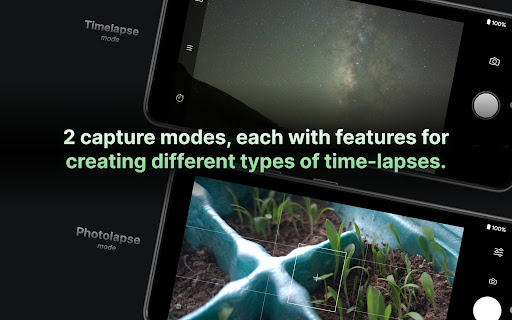
Velocity Lapse: Time Lapse, developed by Noah Rahm, is an advanced time-lapse and intervalometer application designed for photography enthusiasts and professionals alike. With its robust feature set, Velocity Lapse enables users to capture stunning time-lapse videos and sequences with ease, offering two distinct capture modes: Timelapse Mode and Photolapse Mode. Whether you’re interested in documenting the beauty of nature, urban life, or long-term projects like construction or plant growth, this app provides the tools you need to transform hours or days of footage into captivating moments that can be shared and enjoyed.
Graphics & Gameplay
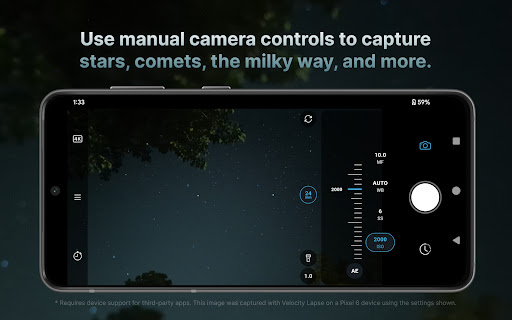
The visual design of Velocity Lapse is both intuitive and functional. The interface is sleek and user-friendly, making navigation seamless even for those who might be new to time-lapse photography. The main capture screen is well-organized, displaying essential camera settings such as ISO, shutter speed, and exposure information clearly. The app also supports both portrait and landscape modes, allowing for flexibility in capturing your subjects.
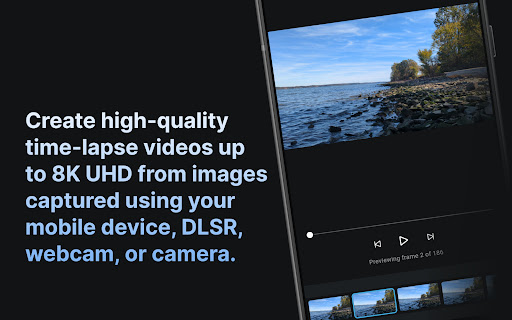
In the screenshots, users can see a vibrant display of camera controls and capture information, with graphical overlays that help to enhance the user experience. The visuals are designed to keep you informed without cluttering the screen, making the process of creating beautiful time-lapses feel effortless. The preview functionality, which allows you to view a lower-quality version of your time-lapse, is particularly useful for assessing your work before final export.
Key Features
- Two Capture Modes: Timelapse Mode for continuous capture at set intervals, and Photolapse Mode for individual photo capture.
- Resolution Options: Export videos in 8K, 4K, 1080p, 720p, or 480p, or as a sequence of images.
- Manual Camera Controls: Adjust ISO, shutter speed, focus, white balance, and zoom settings for optimal image quality.
- Capture Intervals: Set custom intervals for capturing frames, with options for frame limits or infinite captures.
- Foreground Service: The app uses an Android foreground service to keep capturing even when the screen is off.
- Built-in Editor: Preview and delete individual frames, and add date/timestamps to your images.
- Import Images: Import images from your gallery and create projects for additional editing and sharing.
- Bluetooth Remote Support: Start/stop captures and take photos using a Bluetooth remote or volume buttons (Pro version).
Mod Features
- Premium Unlocked: Enjoy all the features of the Pro version without any in-app purchases.
- No Ads: Experience uninterrupted capturing and editing without pesky advertisements.
- Unlimited Money: Access unlimited project storage and capture capabilities without restrictions.
- Enhanced Export Options: Unlock exclusive export settings that allow for higher quality and faster processing times.
- Exclusive Filters and Effects: Apply unique filters and visual effects to your time-lapses for added flair.
How to Install APK on Android
Installing the Velocity Lapse APK on your Android device is a straightforward process. Follow these steps:
- First, ensure that your device allows installations from unknown sources. Go to Settings > Security > Install unknown apps and enable your preferred browser or file manager.
- Download the APK file from a reputable source. You can use the following link to access the APK: Download Velocity Lapse APK.
- Once the download is complete, locate the APK file in your device's file manager.
- Tap on the APK file to initiate the installation process. Follow the on-screen prompts to complete the installation.
- After installation, you can find the app in your app drawer. Open Velocity Lapse and start creating stunning time-lapse videos!
Conclusion
Velocity Lapse: Time Lapse stands out as a powerful tool for anyone interested in time-lapse photography. With its user-friendly interface, extensive feature set, and high-quality export options, it caters to both beginners and seasoned photographers. Whether you want to capture the essence of a bustling city or document the slow growth of a plant, Velocity Lapse gives you the freedom to express your creativity. Don’t miss out on the opportunity to create breathtaking time-lapse videos—download Velocity Lapse today and start capturing the world in motion!
Call to Action: Ready to take your time-lapse photography to the next level? Download Velocity Lapse: Time Lapse now!